October, 2026
I’m an Apple guy, but for reading sheet music and tablature, I bought a TCL NXTPAPER 14 instead of an iPad and I LOVE IT. I have a smaller iPad, and I love it, but I almost NEVER use it for anything. Maybe a little Kindle from time to time, but it’s too small for reading music. I REALLY wanted an iPad Pro, and I’m familiar with all the cool stuff you can do with it, but I still think I’d only use it for reading music, and I just can’t justify the cost, especially if Heather and I both get one. And what if I want two for myself to display two pages at once? So, here’s what I considered before getting the NXTPAPER. Maybe this will help you decide what’s best for you.
“For reading sheet music, the TCL NXTPAPER 14 and Apple’s largest iPads offer different advantages. Screen shape, app choice, sharing options, and price matter more than the diagonal measurement alone.
These are the manufacturers’ listed U.S. prices checked October 14, 2026, before tax. Sales can change, and other retailers may charge less.
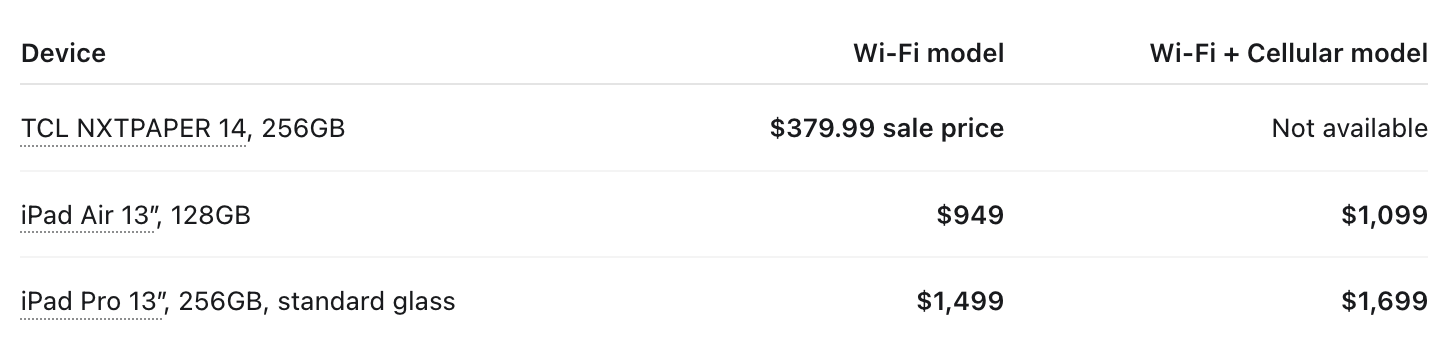
TCL’s listed package includes a stylus and flip case. Apple Pencil and an iPad case cost extra. Music apps and Bluetooth pedals are separate purchases.
The NXTPAPER’s strongest advantages are price and its large, reduced-glare screen. It uses an LCD with a paper-like screen treatment. Its disadvantages include lower pixel density and greater weight: approximately 1.68 pounds before adding a case, compared with roughly 1.36 pounds for the large iPad Air and 1.28 pounds for the large iPad Pro. TCL specifications, iPad Air specifications, iPad Pro specifications.
The iPad Air is the less expensive Apple choice for a large music display. The Pro adds a brighter OLED display, higher contrast, and smoother scrolling, but provides almost the same physical page size. For ordinary PDF scores, I would choose the Pro only if those display improvements or its other capabilities justified the additional cost.
The NXTPAPER’s 14.3″ screen is almost the same width as a 13″ iPad when held upright, but about 1½ inches taller. With ¼″ to ½″ of blank margin cropped from each edge, calculations show that:
US letter music, 8.5 × 11″: Notes appear only about 2% larger on the NXTPAPER than on the 13″ iPad Pro.
A4 music: Notes appear about 10–12% larger on the NXTPAPER because its taller shape fits A4 better.
These estimates assume the entire cropped page is visible in portrait orientation, with toolbars hidden.
MobileSheets works on Apple and Android. forScore is Apple-only. Both support compatible Bluetooth foot pedals, including supported AirTurn and PageFlip models. Cellular service is unnecessary for pedal operation. MobileSheets, MobileSheets pedals, forScore, forScore pedal support.
Both apps can link two tablets to show facing pages. MobileSheets runs on both tablets and uses Book Mode, with single-page, two-page, or alternating page turns. forScore runs on the main Apple device and uses the separately purchased Cue app on the second, displaying the next page and advancing in pairs. Cue requires Wi-Fi to be enabled, but does not require internet service. MobileSheets, forScore/Cue.
At the listed sale price, two NXTPAPER tablets total $759.98 before tax, excluding apps, a pedal, and a suitable stand. The tradeoffs are carrying, charging, mounting, and maintaining a connection between two devices.
Sharing music does not always require internet service. There are several different ways to do it:
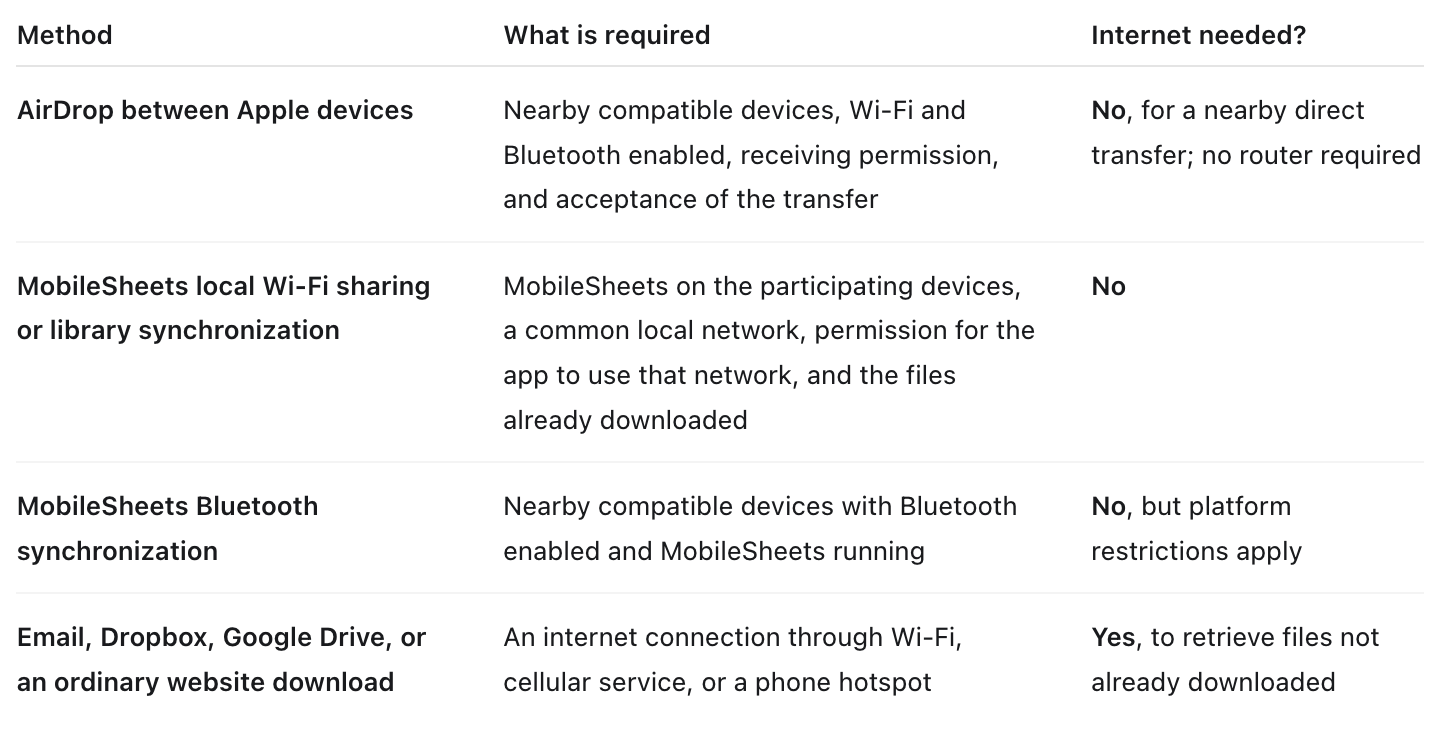
AirDrop uses both Bluetooth and direct Wi-Fi communication. It does not require everyone to join the same router. For a workshop, recipients may need to select “Everyone for 10 Minutes,” accept the transfer, and follow any code prompt. Apple says to disconnect Personal Hotspot when using AirDrop. AirDrop requirements, how AirDrop connects.
MobileSheets can synchronize libraries across Apple and Android over Wi-Fi. Its iPad version’s Bluetooth connection cannot connect to Android or Windows, so use Wi-Fi for a mixed Apple/Android group. Sending PDF copies is useful when recipients use different music-reading apps. Synchronizing page turns is a separate feature from transferring the actual music files. MobileSheets sharing features, MobileSheets guide.
An old router can provide a useful workshop network even with no internet connection. Power it up, give participants its network name and password, and have everyone join. The router must allow devices to communicate with one another; guest-network or “client isolation” settings can prevent that. Devices may report “No Internet,” which is expected.
The router creates the connection, but an app or local file server must supply the music. MobileSheets can handle its supported local transfers. Another option is a laptop hosting the PDFs on a local web page that participants open in their browsers. An ordinary Google Drive or Dropbox link will still need internet access. Install the necessary apps and download the source music before the workshop.
A Wi-Fi-only iPad can read downloaded scores, use Bluetooth pedals, receive AirDrop files, and participate in local sharing or linked-page setups. Cellular capability does not improve those functions.
A cellular iPad adds independent internet access wherever its carrier has coverage. That can be useful for downloading a last-minute score, checking email, or accessing cloud files when venue Wi-Fi is unavailable. It requires a compatible carrier data plan, with an additional service cost. Apple cellular setup.
A Wi-Fi-only iPad or the NXTPAPER can instead use a phone’s Wi-Fi hotspot, if the phone’s plan supports it. That saves the cellular-tablet premium but uses the phone’s battery and data allowance. For a tablet used mainly as a music reader, I would generally choose Wi-Fi-only, keep the scores downloaded, and use a phone hotspot when internet access is occasionally needed. Apple hotspot guidance.” - ChatGPT